When you move a website to a new domain, it might seem simple. You just switch the site over, set up redirects, tell Google about it, and hope everything transfers without a hitch. But in real SEO work, things rarely go that smoothly unless you plan the move very carefully before you launch the new site.
We recently helped a local business move their website to a new domain. The pages and posts all stayed the same and only the main domain name changed. The site had roughly 100 URLs, including the home page, service pages, location pages, and blog posts.
A separate developer handled the new build; we owned the SEO migration, including the crawl review, redirect map, launch checks, Search Console work, and post-launch monitoring. Rankings and traffic recovered on the new domain within weeks, and that recovery did not come from just setting up Search Console. It came from making the right decisions before launch, testing every important URL during the SEO migration, and watching the site closely after launch.
Note: No responsible SEO expert can promise zero ranking movement during a domain change. Google says temporary fluctuations are normal while it recrawls and reindexes the site. The goal is to preserve clear signals, catch mistakes quickly, and give the new domain the best chance to replace the old one cleanly.
4 Common Types of Website Migration
Before planning a website move, first identify exactly what is changing. Most migration projects involve one or more of these four areas:
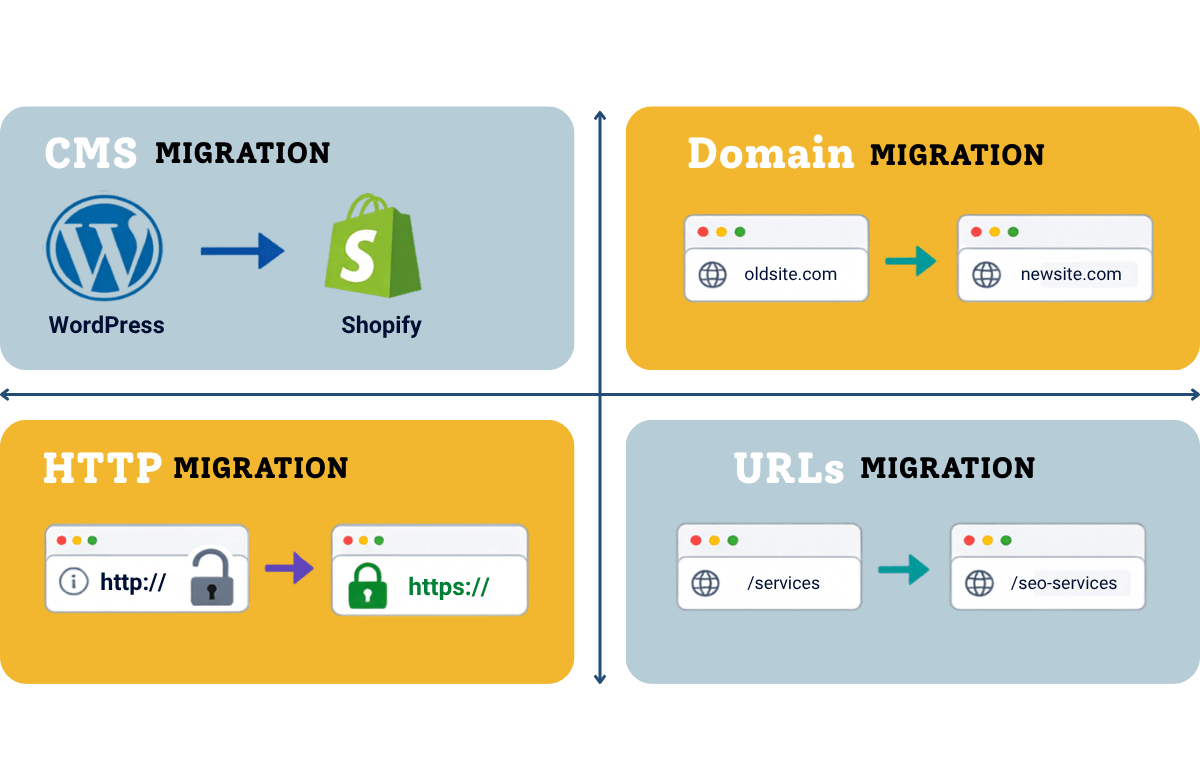
- Platform change: The website moves to a different CMS or ecommerce system, such as WordPress to Shopify.
- Domain change: The entire website moves to a new web address.
- Security protocol change: The website switches from HTTP to HTTPS.
- Site structure change: Pages are moved into different folders or given new paths. For example, website.com/locations/oakland/plumbing/ may become website.com/oakland-plumber/.
Why a Domain Migration Puts Local Rankings at Risk
Your local website ranks because of years of hard work and accumulated signals: content relevance, internal links, backlinks, user behavior, citations, and the relationship between the website and the business’s local presence. A domain migration changes the URLs that hold many of those signals.
Several problems can contribute to losing SERP results:
- An old service page redirects to the homepage instead of its matching new page.
- A staging noindex tag remains on the live site.
- Canonical tags still point to the old or staging domain.
- Internal links send users through redirects instead of linking to final URLs.
- The new XML sitemap contains temporary, blocked, or redirected URLs.
- The domain, CMS, navigation, content, and URL structure all change at once.
This is why we should treat a domain migration as an SEO project, not only a development task.
Before launch, we had a written SOP and a URL-mapping template in place. That gave the project a clear structure and made it easier to keep decisions controlled rather than rushed on launch day.
How We Handle a Local Website Domain Migration Without Losing SEO Rankings
1. Record the Baseline Before Anything Moves
Before touching redirects, we record a baseline of how the old site is performing. Without a baseline, a post-launch report can show movement but cannot explain what was preserved, lost, or improved.
Our baseline normally includes:
- Overall website performance
- Top-performing keywords and pages
- Organic traffic from Analytics
- Search Console clicks, impressions, queries, and pages
- Tracked rankings for core service and location terms
- List of indexed URLs
- Backlinks pointing to the home page and other pages
- Leads, calls, and form submissions where tracking is available
- Current XML sitemap URLs
- A full crawl of the old domain
2. Verify the Old and New Domains in Search Console
The first step was to add the new domain as a domain property in Google Search Console before launch.
Always use a domain property in Search Console setup because it covers all protocols and subdomains under the domain instead of a single URL version.
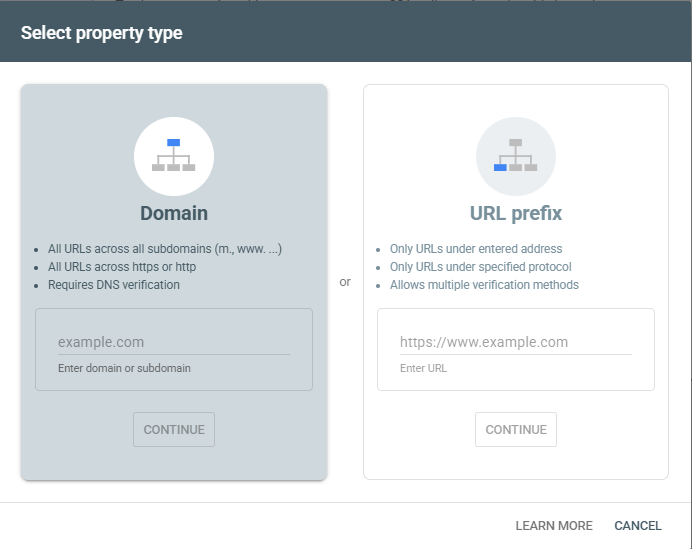
For a domain migration, both properties (old and new) must be available to the same verified owner before the Change of Address request can be completed.
Search Console becomes one of the main monitoring tools during the migration because it shows crawl, indexing, sitemap, and performance data for the site.
3. Crawl the Old Site and Build a Complete URL Mapping
As mentioned, we already had a URL-mapping template, but you should crawl the old site with Screaming Frog or a similar crawler such as SEMrush or SE Ranking before building the redirect map.
You need to capture or uncover everything like service pages, blog posts, redirect chains, broken links, images, PDFs, and pages that are still receiving traffic despite being hard to find on the site.
We combine several sources because no single export is complete:
- Crawl data
- XML sitemap URLs
- Search Console page data
- Analytics landing pages
- CMS exports
- Backlink reports
- Rank-tracked landing pages
4. Build a 1:1 Redirect Map
The redirect map is the most important part of the migration.
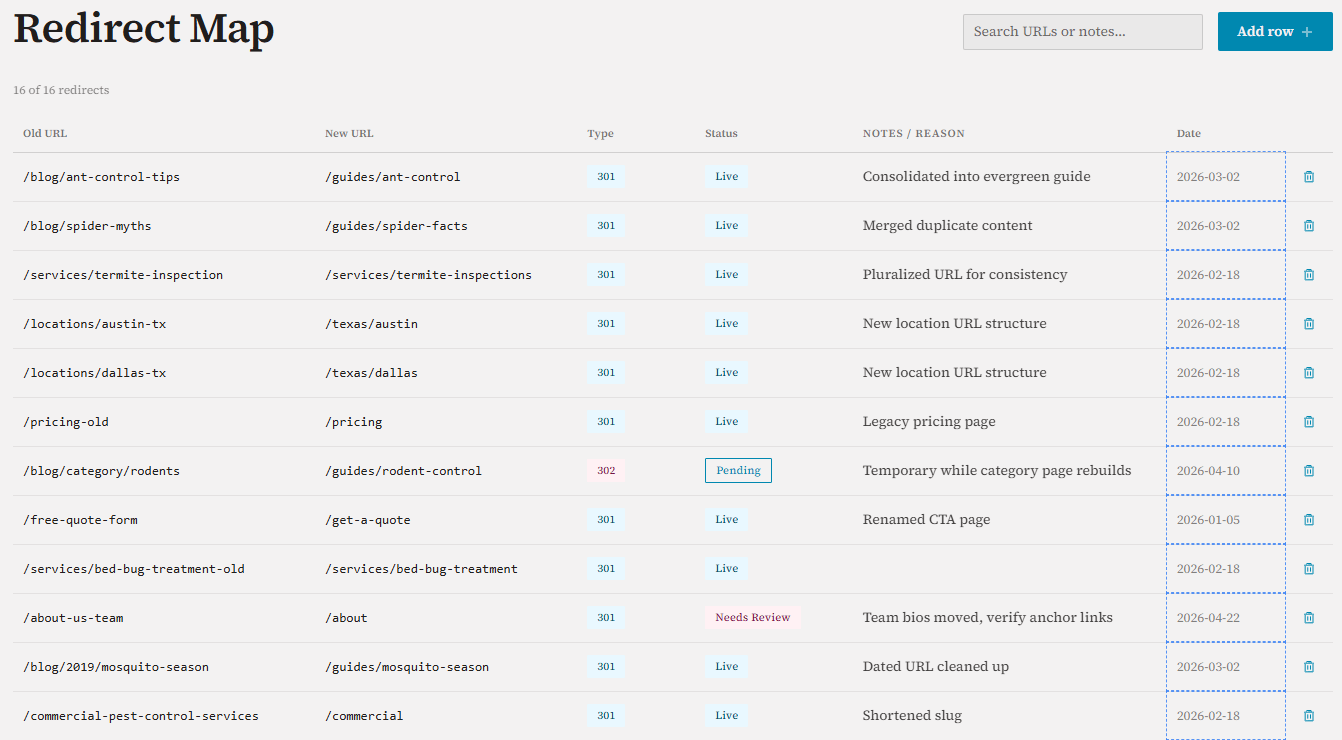
Each old URL needs a logical new destination.
- An old service page should redirect to the matching service page.
- A city page should redirect to the equivalent city page.
- A blog post should point to its replacement or to a genuinely relevant consolidated resource.
You should avoid redirecting everything to the homepage because that weakens relevance and creates a poor user experience.
Our redirect sheet usually contains these fields:
Field | Purpose |
Old URL | The address that currently holds traffic, links, or index history |
New URL | The final destination on the new domain |
Page type | Service, location, blog, image, PDF, or utility page |
Priority | Helps the team test revenue and ranking pages first |
Old status | Records existing 200s, redirects, 404s, or other issues |
Planned action | 301/308 redirect, 404, 410, or manual review |
Final destination | Confirms where the URL lands after testing |
Notes | Records consolidation decisions and developer instructions |
Google’s site-move documentation specifically highlights URL mapping as an important part of preparing a site migration process. This is where many migrations succeed or fail.
5. Avoid Changing the Structure and Content
We are already changing the domain, and if we also change the URL structure, add rewritten content, or introduce a completely different design, then if rankings drop, it becomes harder to know what caused the issue.
Our preference is to keep page intent, core copy, headings, internal relationships, and URL paths as stable as the project allows. If the old site has oldsite.com/services/service-name/, the cleanest new version is often newsite.com/services/service-name/.
6. Complete the Pre-Launch Technical Checks
Before launch, we review the final website structure with the developer. This is the point where a short technical check can prevent weeks of recovery work.
Our role as the SEO migration lead is to make sure the SEO migration pieces are ready and that the launch sequence does not create crawl or indexing issues.
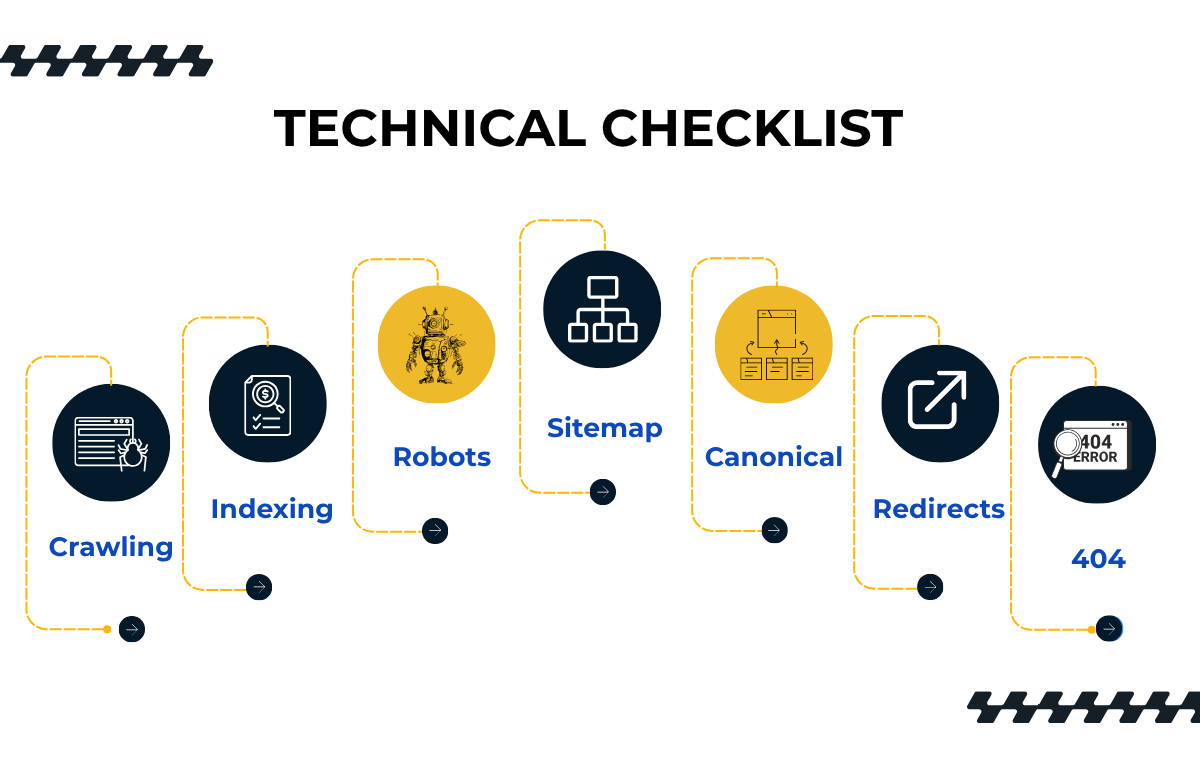
Here is the checklist:
- Every final URL matches the approved redirect map.
- Important pages are indexable and do not contain staging noindex directives.
- txt does not block important pages or resources.
- Each indexable page has a self-referencing canonical on the new domain.
- Canonicals, hreflang annotations, structured data, and Open Graph URLs do not reference staging or the old domain.
- Internal links point directly to new URLs.
- The XML sitemap lists only canonical, indexable, 200-status URLs.
- Images, PDFs, forms, phone links, and conversion paths work.
- Analytics, call tracking, consent tools, and form tracking are installed correctly.
- A custom 404-page works and returns a real 404 status.
- Redirect rules are prepared but will not be activated before the new site is ready.
7. Launch Direct Permanent Redirects
For a permanent domain move, we should use server-side 301 redirects. Each old URL should redirect directly to its final new URL.
This is the pattern:
oldsite.com/service/ -> newsite.com/service/
Here is guide to do setup redirect:
Step 1: Set 301 wildcard redirect from domain end (Godaddy and some hosting support this). Then set .htaccess on old domain root document as follow.
Example for Wildcard Redirects (entire domain):
RewriteEngine On
RewriteCond %{HTTP_HOST} ^abc\.com$ [NC,OR]
RewriteCond %{HTTP_HOST} ^www\.abc\.com$ [NC]
RewriteRule ^(.*)$ https://www.xyz.com/$1 [L,R=301,NC]
This will redirect abc.com/any-path to xyz.com/any-path.
Example for 1:1 Page Redirects:
Redirect 301 /old-page.html https://xyz.com/new-page.html
Redirect 301 /blog/old-post https://xyz.com/blog/new-post
Step 2: Keep old domain for another a year. (active status)
After the redirects are live, we should check the old URL list and analyze whether every important old page returns the correct redirect status and final destination.
Make sure you also test important pages manually in a browser too and then test priority service and location pages manually along with the homepage for whether contact form is collecting leads, phone & email link is working and so on.
8. Submit the Change of Address in Google Search Console
Once the new site is live, crawling and indexing are fine, and the redirects have passed testing, then submit the Change of Address request from the old Search Console property.
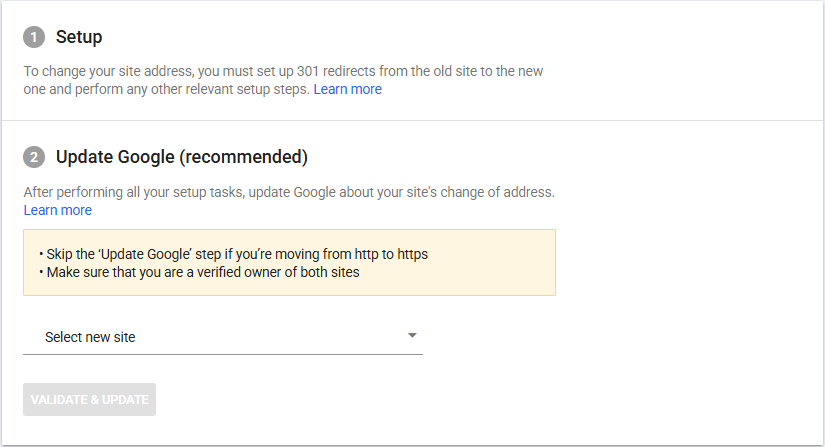
Do not submit it before the redirects work. The tool performs pre-move checks, and Search Console ownership should already be confirmed for both sides of the move.
The tool is intended for moves between domains or subdomains. It is not used for a hosting change with the same URLs, a simple HTTP-to-HTTPS move, a www to non-www switch on the same domain, or a path change within one site. Those cases rely on their appropriate redirect, canonical, and sitemap handling instead.
9. Submit the New Sitemap and Update Every Link You Control
Next, submit the new XML sitemap in Search Console.
Then update links in the header and footer sections of the website, email marketing, PPC ad copies etc. so users and crawlers do not have to pass through the old domain unnecessarily.
That list includes:
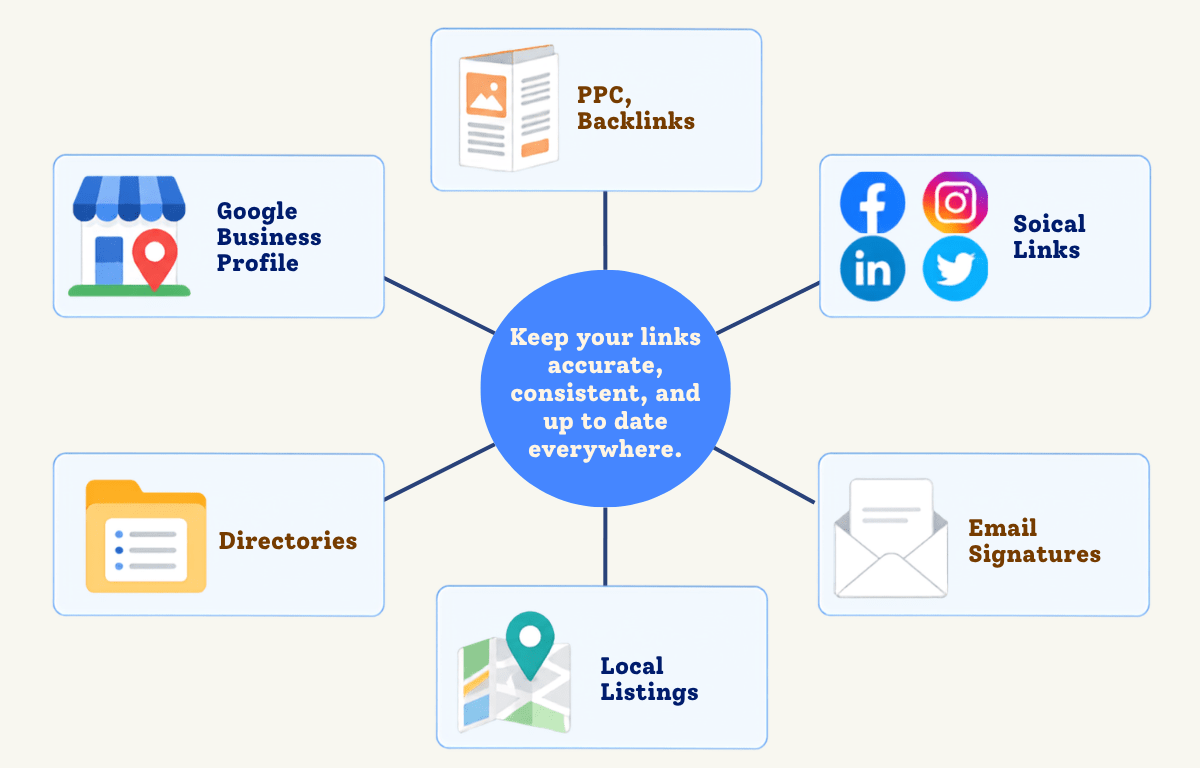
- Internal links and navigation of the website
- Google Business Profile website and appointment links
- Bing Places, Apple Business Connect, Yelp, and priority industry directories
- Social media profiles
- Paid advertising landing pages
- Email templates and signatures
- Structured data fields such as url, @id, and relevant sameAs references
For local SEO, update the business listings and citations that send traffic, leads, or strong local trust signals. For valuable backlinks, contact the site owner and request a direct update to the new URL even though the redirect is in place.
10. Monitor Indexing, Traffic, Leads, and Rankings
Rank tracking is useful, but it is only one view of the migration. We should keep monitoring whether Google is crawling the old URLs, discovering the new ones, assigning the expected canonicals, and shifting impressions and clicks to the new domain.
We should watch for:
- New URLs gaining impressions and clicks
- Old URLs dropping from the index over time
- Unexpected 404 or 5xx responses
- Redirect errors and chains
- Pages marked crawled but not indexed
- Canonical mismatches
- Sitemap warnings
- Organic landing-page traffic
- Calls and form submissions
- Movement across priority local keyword groups
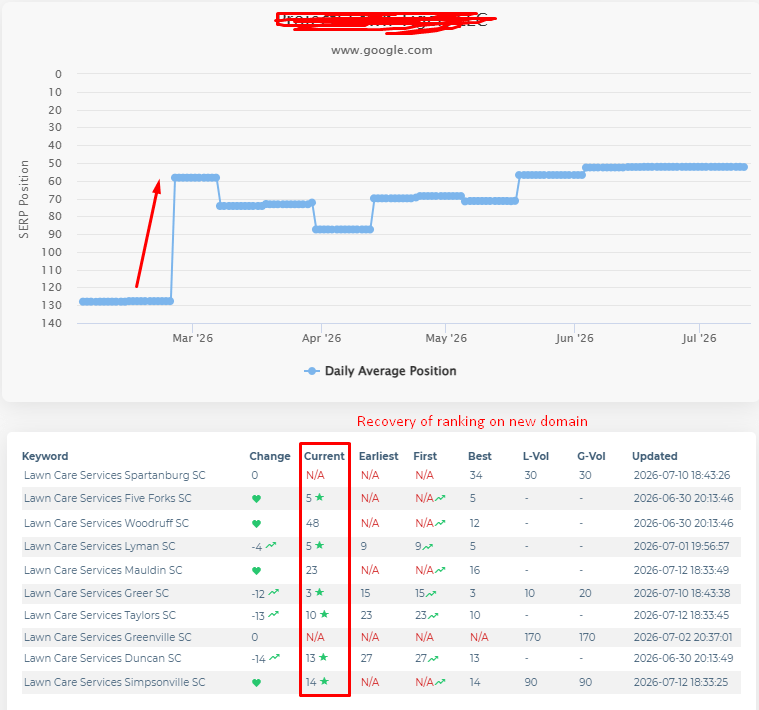
In the recent migration we handled, tracking on the old domain showed several keywords as N/A or not found after the move.
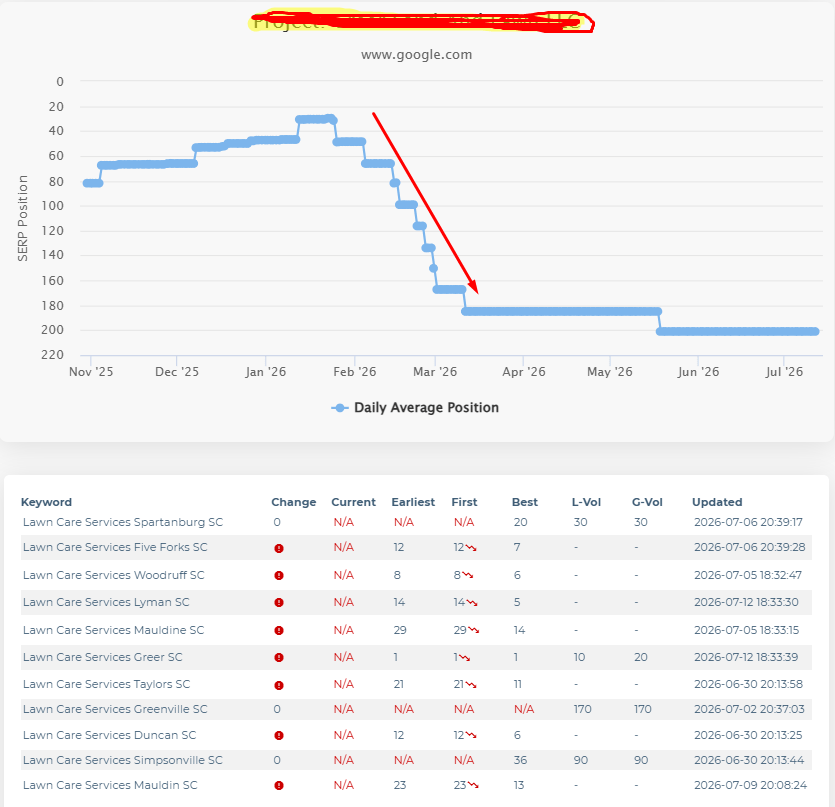
That is expected because the old domain is no longer the page Google should show. The important question is whether the new domain starts appearing for those same keyword groups.
In our case, the new domain showed rankings restored across multiple local service terms within a few weeks, including several keywords in strong visible positions.
11. Keep the Old Domain and Redirects Active
One mistake we see most experts make is turning off the old domain too early.
Turning off the old domain too soon breaks backlinks, pages, citations, and Google’s ability to process old URLs.
And what happens if someone else buys your domain after you let it expire?
Google’s Site Moves and Migrations blog advises keeping redirects for as long as possible, generally at least one year to prevent misuse by someone else.
We keep the old domain registered and the redirects active beyond the minimum when cost and infrastructure allow, especially when the domain still receives traffic or has valuable backlinks.
An old domain should be retired deliberately, not abandoned the week after launch.
Strivers Edge Post-Migration Monitoring Schedule
We use a simple monitoring rhythm for migrated websites.
Period | What we check |
Launch day | Redirects, canonicals, robots rules, indexability, sitemap, tracking, forms, and priority pages. |
Days 1-7 | Search Console errors, indexed pages, rankings, traffic, leads, server errors, and redirect behavior daily. |
Weeks 2-4 | Impressions, clicks, indexed URLs, rankings, crawl issues, and lead quality at least weekly. |
End of month 1 | Close-out report covering what moved, what recovered, remaining issues, and next actions. |
Months 2-3 | Ongoing trend review and cleanup of citations, backlinks, redirect chains, and missed legacy URLs. |
Common Migration Mistakes to Avoid
- Building the redirect map after launch
- Redirecting every page to the homepage
- Leaving noindex or staging canonicals on the live site
- Changing the domain, CMS, content, navigation, and URLs together
- Forgetting PDFs, images, old landing pages, or backlink destinations
- Using temporary redirects for a permanent move
- Creating redirect chains instead of pointing to final URLs
- Submitting Change of Address before the site is ready
- Judging the migration from one keyword or one day of data
- Cancelling the old domain or hosting before redirects have done their job
Most of these mistakes are preventable. That is why the checklist and redirect map matter.
Final Takeaway
A local website domain migration is successful when the new domain becomes the clear replacement for the old one: users land on the right pages, Google crawls and indexes the new URLs, organic visibility transfers, and leads continue without a hidden technical break.
Need help with a website migration? Strivers Edge can plan and execute the SEO side of the move before rankings are put at risk.

Mandeep Singh is a Digital Marketing consultant at Strivers Edge, renowned for driving first-page Google rankings for businesses in competitive industries. With more than 10 years in the industry, he specializes in digital and content marketing.