
Keyword research can tell you what your intended audience is looking for and help you make data-driven decisions about which keywords to target. However, as AI reshapes how Google understands user queries, ranks content, and generates search results, choosing the right keywords now requires a better understanding of search intent, competition, relevance, and the topics users actually search.
As an SEO strategist, I conduct keyword research using the top 5 tools, so SEO teams or small businesses can use this guide to enhance their SEO strategies. The goal is simple: to show what each tool actually gives you once you enter a keyword.
This list includes KWFinder, Keyword Tool, Ubersuggest, SE Ranking, and Semrush to help you gather information on what data they provide and how useful it is when deciding which keywords are worth targeting.
To get real user search data, I searched the same keyword through all 5 tools. They give different outputs for search volume, competition, and KD (keyword difficulty), but you have to understand what your audience searches for and select the best ones.
Key Metrics to Understand Before Using Keywords Research Tools
Organic traffic relies on what keywords or quires you target and here are some of the common question you should ask yourself before making the final list:
- How many people search for this keyword?
- How hard will it be to rank?
- What commercial value does the search have?
- What is the user really looking for?
- Which websites already appear at the top?
Here are the key metrics to judge which keywords are potential to target:
- Search volume: Keyword search volume is an estimate of how many people enter that exact phrase in the search bar within a set timeframe.
- Keyword Difficulty or SEO Difficulty (KD/SD): Keyword difficulty is calculating how difficult is keyword rank on search results based signals like competitor authority, backlinks, content quality, and SERP competition.
- CPC (Cost Per Click): Average cost-per-click (avg. CPC) is the amount advertisers pay Google whenever someone clicks an ad tied to that keyword.
- Search Intent: User or search intent is what the purpose of search or intent behind a search query. Here are top 4 search intent of user when they search is Commercial, Transactional, Informational & Local.
- SERP: A serp is a search engine results page you see after the keyword research on search bar.
- Keyword Idea Tabs: Every tool can quickly expand your one seed keyword to generate thousands of keyword ideas through Related or Similar terms, Autocomplete and Questions tabs.
A keyword’s value shouldn’t be judge as potential for the SERPs by single metric. Valuable keyword might be coming from less-searched phrase with commercial intent.
I hope you understand the basics of keywords research; the next step is to see how each of the 5 SEO tools presents the data for same keyword.
Let’s start exploring:
KWFinder by Mangools
Best for Spotting Easy-to-Rank Long-Tail Keywords
With KWFinder, I searched the most important keyword for our agency, “SEO agency in India,” by targeting the USA. We wanted to see what types of global audiences search for to look for SEO services in India.
The main feature of the tool is that it brings key information together in a single interface. That makes things easier for everyone, especially beginners, local businesses, and SEO teams looking for long-tail opportunities.
What You Actually Get
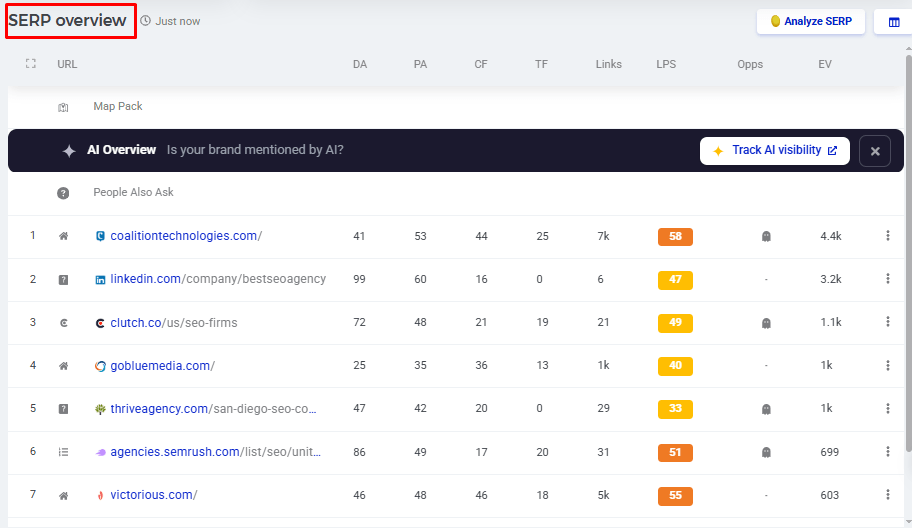
- SERP Overview with authority metrics: You will be surprised to see Domain Authority, Page Authority, and backlink metrics like CF and TF for every ranked site in the top 10 results. This data will help you understand which sites you would actually have to outrank.
- Search Trends: The tool also estimates monthly search volume and shows how keyword trends are changing. This helps you tell which keywords are searched regularly and which ones are seasonal or losing interest.
- Clusters (BETA): Keyword grouping in this tool is very relevant and comprehensive.
- AI Search Watcher: You can also track how often your brand or keyword shows up inside AI-generated search results.
- Search by Domain: Enter your competitor domain url in the Search by domain bar and see the exact terms sending them traffic, skipping the seed keyword step entirely.
- Relative Keyword Difficulty (RKD): It estimates how challenging ranking may be for a particular page on your website.
Step by Step: Researching Keywords with KWFinder
You can start researching keywords on KWFinder in two ways: Search by Keyword if you have a seed term, or Search by Domain if you would rather spy on a competitor. Below, I will show you the 7 stages of the keyword research journey.
1. Enter your keyword Idea
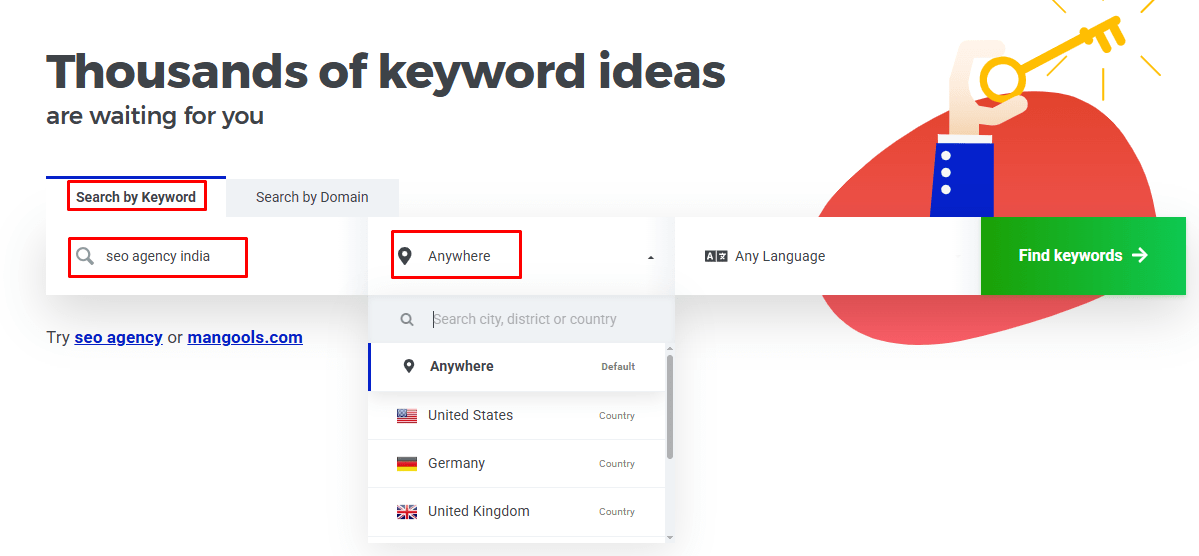
To get started, just enter a keyword idea and choose your country in order to start searching. I researched “SEO agency India,” then selected the US.
2. Start with Keyword Difficulty
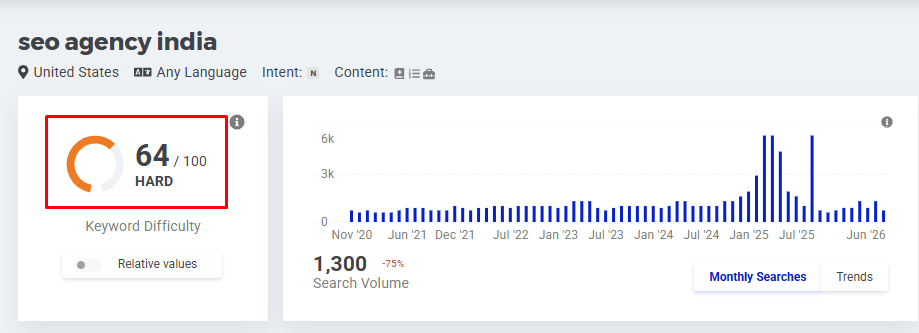
Next, analyze the KD column to understand how easy or challenging it is for the terms you want to rank.
3. Review all 3 Keyword Idea Tabs
- Related Keywords: In this tab, you will see search queries that are related to your keyword.
- Autocomplete: It suggests relevant queries to users from Google Autosuggest.
- Questions: In this tab, you will find a list of the most common questions users ask directly on Google and other search engines.

4. Search Filter
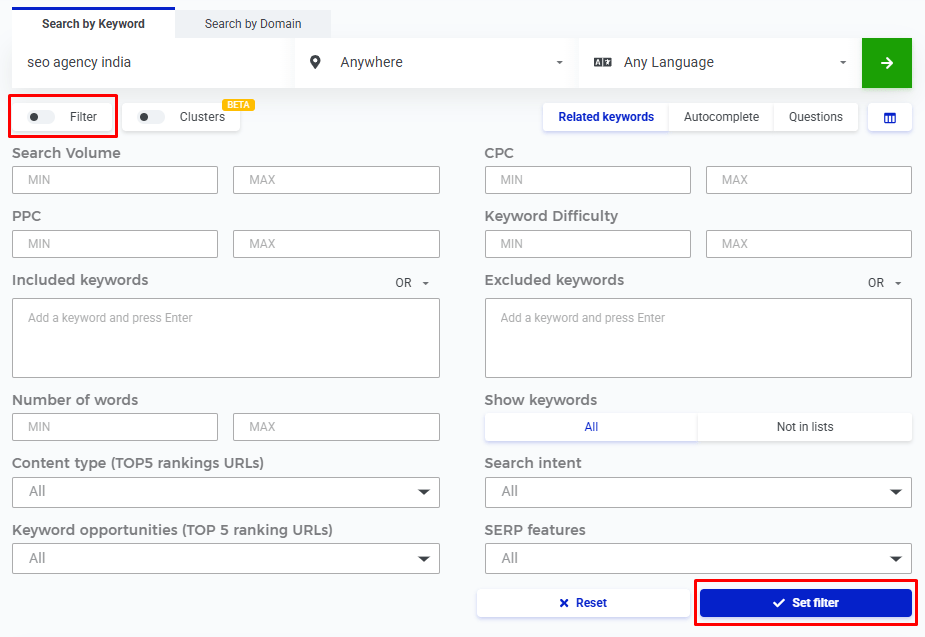
Search filters narrow a search or streamline your findings by removing keywords that aren’t relevant. To filter your keyword results, open the filter panel and filter your results by search volume, keyword difficulty, and any words you don’t want to see. This feature lets you find the best terms and gives you more options to filter for accurate results.
5. SERP Results
This is one of the best features of the tool that you can use to examine the top 10 SERP results for the selected keyword. It will help you understand how your website is competing against the competitors sitting at the very top.
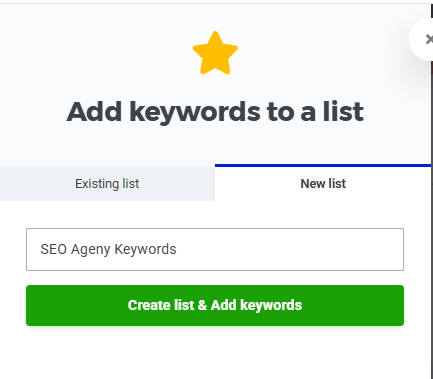
6. Organize and Save Keywords
It’s easier to organize and save a list of top keywords that clearly meet your needs.
7. Export your keyword list
Export keywords in CSV format to use in Excel.
Ubersuggest
Best for a Budget-Friendly Keyword Research Tool
After completing the research process with KWFinder, next I will consider testing Ubersuggest. The cost of this tool is less than the bigger enterprise SEO suites. Money is a big reason, so it’s a first choice for freelancers, local businesses, and small agency teams.
The Interface is quite clean and provides end-to-end keyword research solutions. The main feature that makes Ubersuggest different from KWFinder is First Page Potential.
When you add your website to FPP, rather than showing you a common difficulty score, it predicts based on your website’s current performance. This helps you decide whether a keyword is actually worth your time or not.
Where Ubersuggest Stands Out
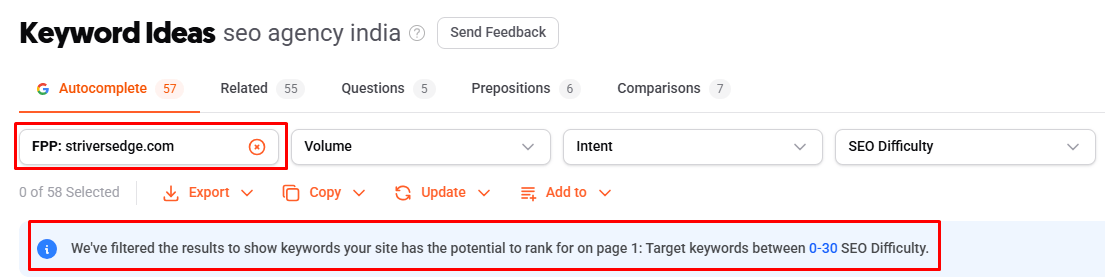
- First Page Potential (FPP): This feature is dedicated to replace average difficulty score as it provides custom based on your website current performance stats. To get started, just add your domain to the FPP and estimate how easy or difficult your website actually to reach the first page for that keyword.
- Search Intent: Ubersuggest places a color-coded search intent on keywords, and you can quickly analyze the intent behind each term or keyword.
- Multiple Keywords Research in One Search: Yes, exactly, you are not limited to searching one keyword at a time like in most other tools. Ubersuggest lets you research several keywords together in one search.
- Comparisons Tab: In this tab, you can explore multiple search terms that give comparison keywords like my output “SEO agency vs freelancer”.
- Questions and Prepositions Tabs: Each tab’s keyword collection provides the best suitable results in your niche. The Questions tab allows you to find question-based keywords, and Prepositions help you find more specific long-tail phrases like “SEO agency for small business“.
- Update Feature: Ubersuggest’s keyword upgrades generally give you the option to refresh that data yourself, so you are not making decisions based on old numbers.
Step by Step: Researching Keywords with Ubersuggest
Like KWFinder, you can either type keywords or start with competitor keywords. Below, I will show you the 7 steps of the keyword research process in this tool.
1. Enter your seed keyword
To get started, simply enter your keyword idea and select the language, country, and location you want to target. As. Ubersuggest also allows you to research more than one keyword at a time, so I entered three primary keywords together and selected the US as my target market.

2. Check search intent first
Next, analyze and identify search intent, which tells you what the searcher is actually trying to find. Here is how the 5 labels usually look in practice:
- Commercial: best SEO agency
- Transactional: hire SEO agency
- Informational: what does an SEO agency do
- Navigational: Neil Patel Ubersuggest
- Local: SEO agency India
3. Review SEO Difficulty
Once you’ve identified your shortlisted keywords by choosing search intent, next go through the SEO Difficulty score to understand how competitive the keywords are.
4. Explore the specialized keyword tabs
These tabs allow you to find data related to different keywords as follows:
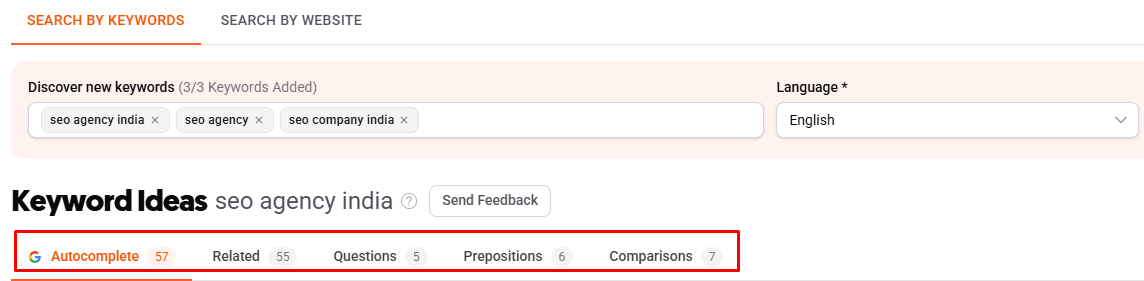
- Questions: These are the question-based keywords people are asking about your niche.
- Comparisons: Comparison keywords are used to compare topics, which work well for comparison articles.
- Prepositions: You can use the Prepositions tab to find long-tail keywords such as “SEO agency for small business”
- Related: The Related tab allows you to discover related keywords that are more closely related to your primary search.
5. Narrow the list with filters
The Ubersuggest keyword filter lets you remove the results that do not fit your content plan. These are the filters I normally rely on:
- FPP (I set mine to striversedge.com)
- Volume
- Intent
- SEO Difficulty
- Cost Per Click
- Include / Exclude
6. Refresh outdated keyword data
Give your keywords a refresh and see the latest trends. This extra step is especially worth taking when the keyword is going to be the main target of a pillar service page.

7. Save or export your keywords
Select the keywords you want to keep, and click “Copy Selected” to send the keywords directly to Excel or Google Sheets.
You can also export to save the results as a CSV format.
Keyword Tool (KeywordTool.io)
Best for Keyword Research Outside Google
Keywords.io adds a new layer to keyword research by giving you the option to search across different platforms like YouTube, Amazon, Instagram, etc. The free version gives you a keyword list with a few options, but metrics like volume, trend, CPC, and competition stay locked until you move to Pro.
What Makes Keyword Tool Different?
- Multi-platform Autocomplete: Autocomplete in Keywords.io predicts searches from YouTube, Amazon, eBay, Bing, Instagram, Twitter, Pinterest, and the Play Store based on what the user is typing.
- Keyword Basket: Get your most profitable keywords from different searches into one list in the same session.
- Negative Keywords: Unlike other tools, you can add negative words that strip results from the entire list, saving you from cleaning the sheet later.
- Hashtag Suggestions: The tool gives you a list of hashtag ideas, which is helpful if you are creating social content on the same topic.
- Trend Column: This quick column shows you exactly whether the trend of a keyword is rising or falling.
Step by Step: Researching Keywords with Keyword.io
Here is how I would run the same seed keyword, “SEO agency”, through this tool and finish with a list I can actually use.
1. Pick your platform first
Before you start, select the platform tab at the top of the page.

2. Set location and language, then enter your seed keyword
Next, use the dropdowns next to the search bar to pick your country and language.
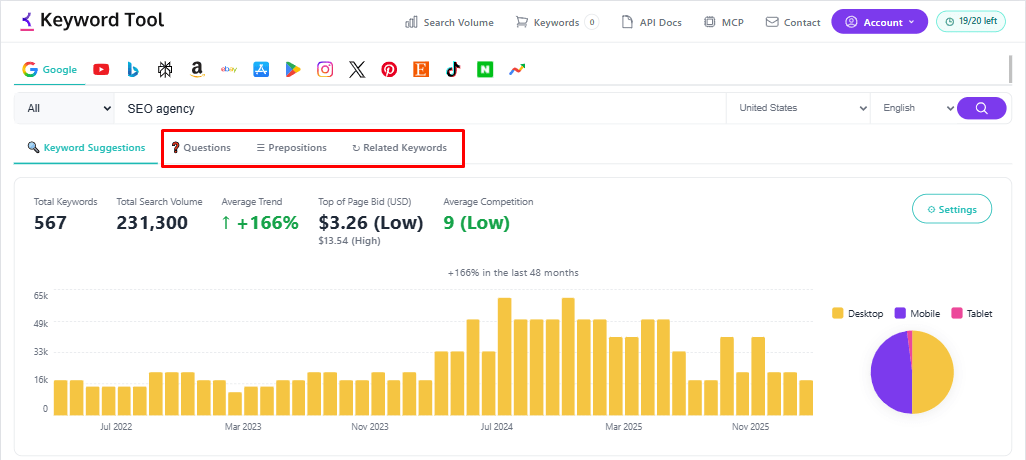
3. Review all 3 keyword idea tabs
Then, go through all 3 tabs, as each one returns a different set of keyword ideas:
- Keyword Suggestions: In this guide, you’ll get the broad list of terms which gives you the multiple options to take a look.
- Questions: Targeting questions keywords is a powerful idea for unlocking traffic from ai tools. The Questions tab collects question-based keywords for blog topics, FAQs, and supporting content.
- Prepositions: The Prepositions tab returns long-tail phrases such as “SEO agency for small business” or “SEO agency near me”, which usually carry local or commercial intent.
4. Check the Trend column before you decide
Check the Trend column to see which keywords are becoming more popular. This helps you focus on terms that are growing instead of those losing traffic.
5. Save to the Keyword Basket, then export
After you have shortlisted your keywords, select the ones you want to keep and send them to the Keyword Basket instead of exporting each search separately. Once you have finished with all your seed keywords and platforms, use the Export option to download the complete list.
SE Ranking
Best for Agencies and Enterprises
SERanking is a complete SEO platform, and its keyword research tool helps you find easy-to-target terms that you should aim to rank for. This tool is designed to streamline keyword research discovery and the mapping process. It’s not just a keyword finder, and you can see that how much context it puts around every single keyword.
I ran “seo agency india” through it and the difference showed up quickly.
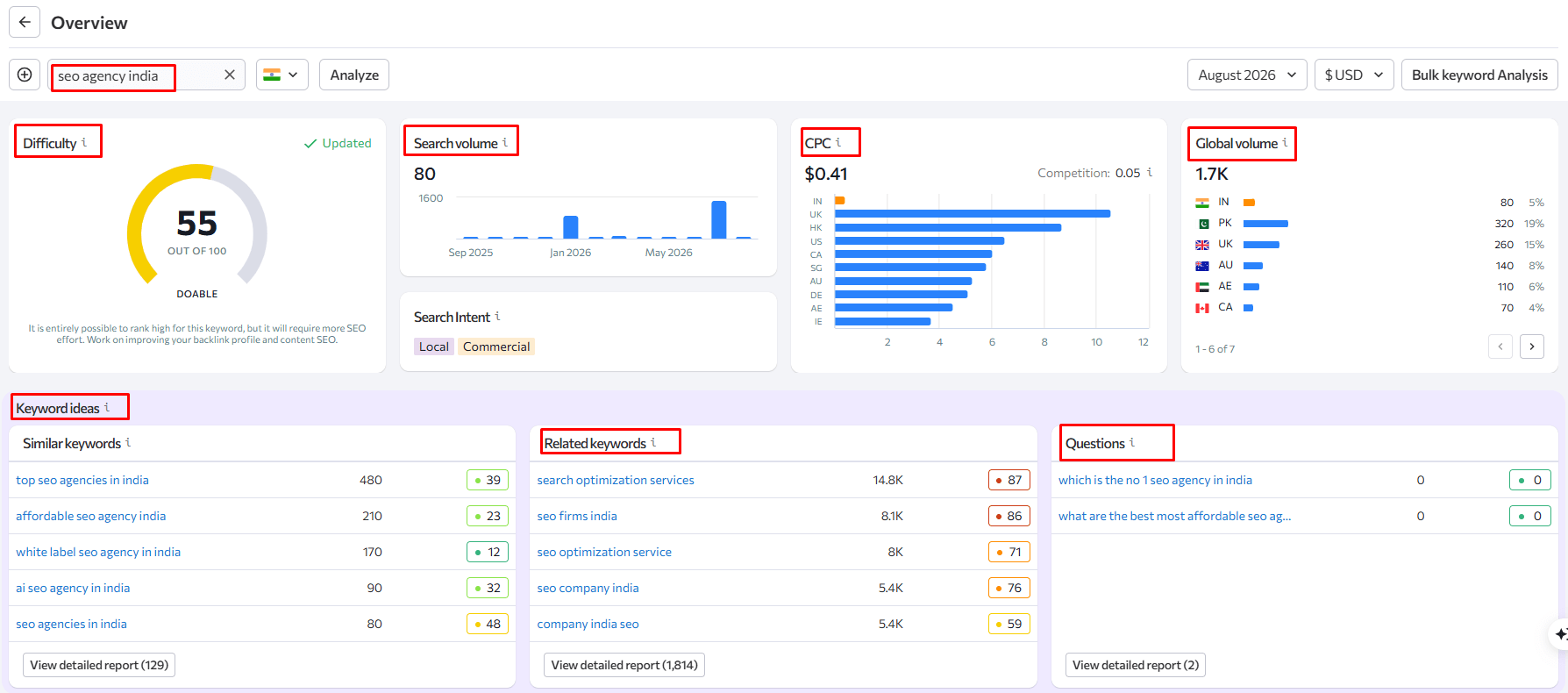
What sets it apart:
- Global Volume by country: In SEranking, global search volume refers to how often a specific keyword is searched worldwide, which is very helpful if you are targeting more than one area.
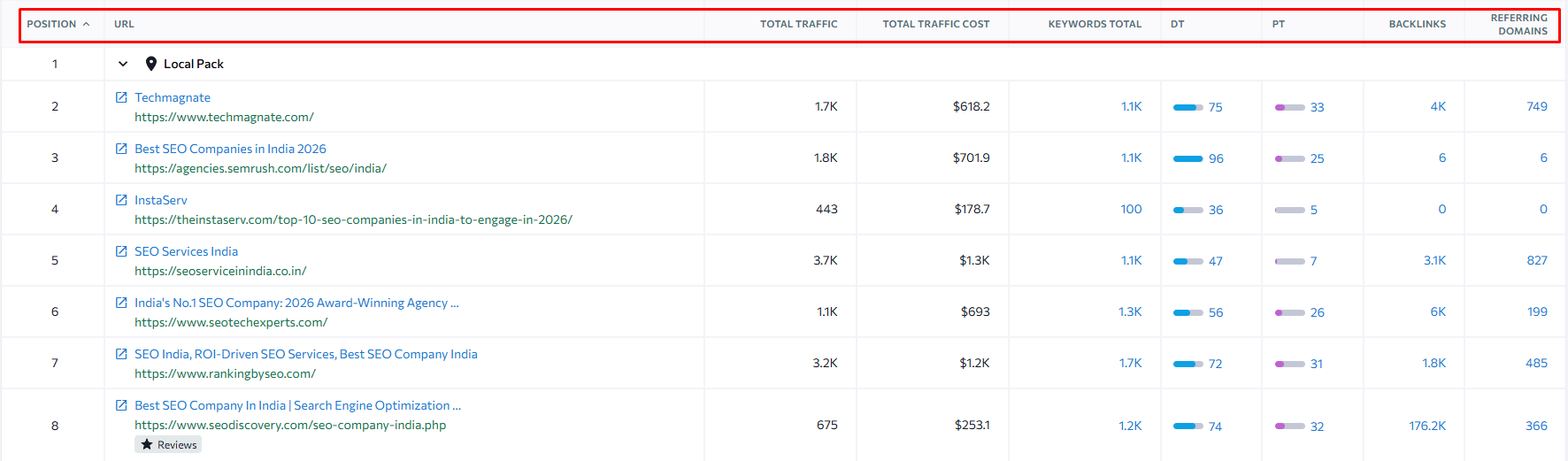
- SERP Overview with traffic and volatility data: For each ranking page, the tool will show you the total traffic, the number of keywords, and the keyword rank trend.
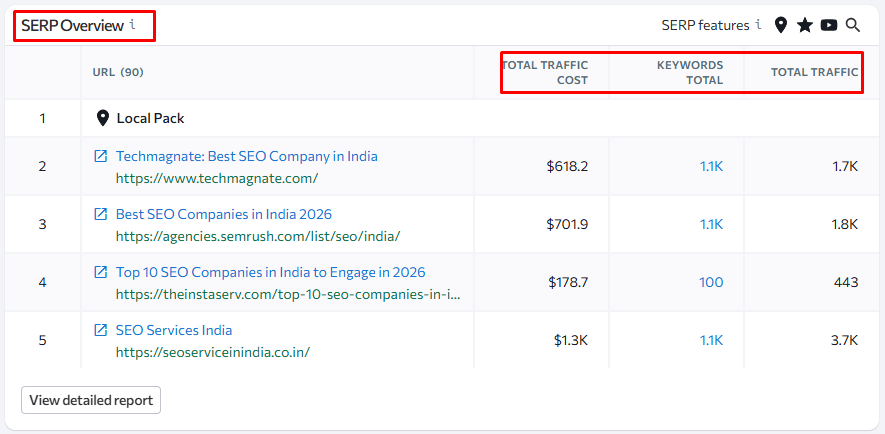
- SERP Features: You can add or remove search features from a keyword, such as Local Pack, review stars, or Featured Snippet.
- Low Search Volume Keywords: This tab shows terms with very little search traffic compared to more popular keywords that most tools leave out. These keywords are good to start with and easy to rank.
- Column control: You can choose which metrics appear in the table before exporting, so the sheet you share only includes the columns you need.
Step by Step: Researching Keywords with SE Ranking
1. Enter your seed keyword and select your region
I entered “SEO agency India” into the search bar and picked the target country.
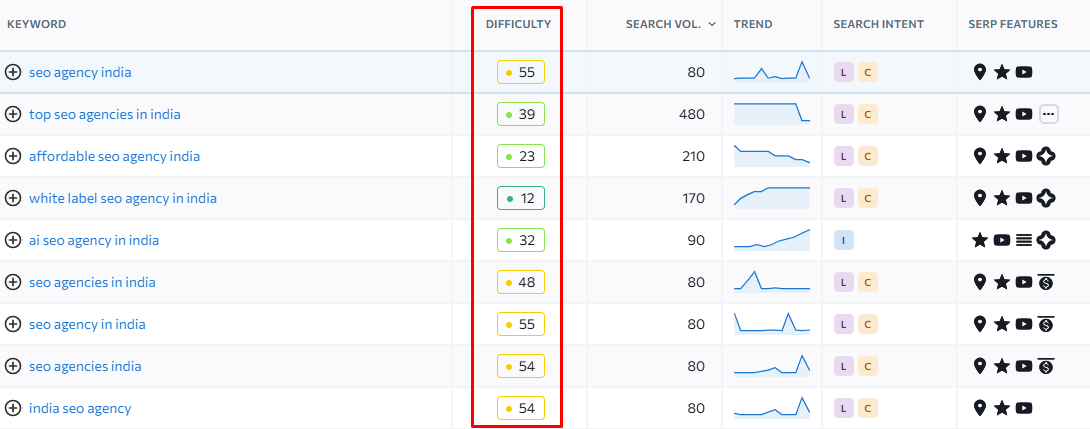
2. Start with the Difficulty score
Look at the Difficulty score in the keyword overview. Think of it as your first impression, but make sure to open the SERP and see which sites rank at the top before making any decisions.
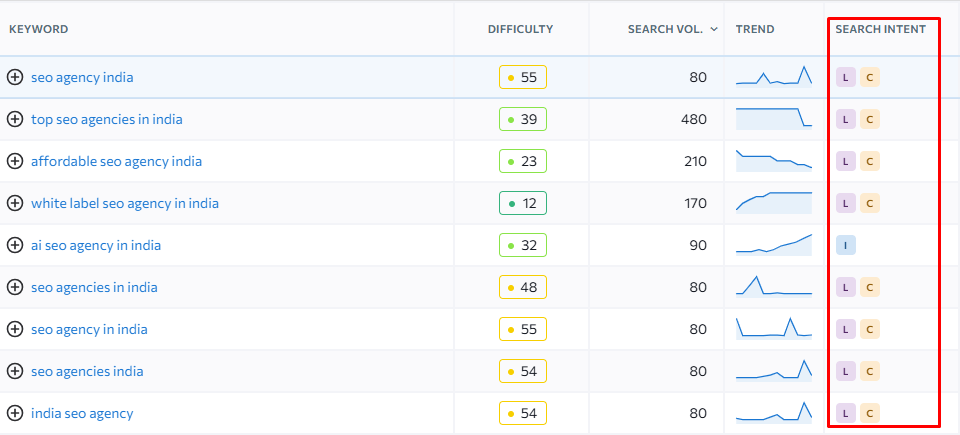
3. Check the search intent label
SERanking labels each keyword with an intent type. If you offer a service, use Commercial and Transactional keywords for your service pages, and use Informational keywords for your blog posts.
4. Work through the Keyword Ideas tabs
Each tab gives you a different perspective on the same topic.
- Similar keywords: These are close variations of your main keyword. You can often find options here with higher search volume or lower difficulty.
- Related keywords: These are broader terms that help you cover the topic more completely.
- Questions: These are great for blog posts, FAQs, and other supporting content.
- Low search volume: These are terms that other tools might miss. They can be useful for building topic clusters.
5. Open the SERP Overview before you commit
Analyzing the SERP is important to understand how strong the top 10 competitors are. Look at things like their traffic, total keywords, and domain or page trust. Review each result closely. If you see mostly business listings or press releases, you might be targeting the wrong keyword.
6. Filter the list down
You filter keywords by,
- Search
- Difficulty
- Search vol.
- SERP features
7. Set your columns, then copy or export
Click on Columns to add or remove metrics like Trend or CPC, so you only see what matters to you. Use the Copy icon next to Export to copy selected rows or the whole table, then paste them into Excel or Sheets.
SEMrush
Best for Large Scale Keyword Discovery and Clustering
SEMrush’s Keyword Overview and Magic tools give you a quick look at each term and help you find many variations for the same keyword. When I searched for “SEO agency” in both tools, I noticed a smart difference between them. SEMrush is the expensive tool and takes the most time to learn. Agencies or in-house teams working with large-scale clients will find its features worth the investment.
What sets it apart:
- Keyword Match Types: The 3 different keyword match types (Broad, Phrase, Exact, or Related) help you understand how closely a search query relates to your services.
- Topic Groups: In this feature keywords are generally grouped or categorized into sub topics and help you narrows down terms to the most relevant options.
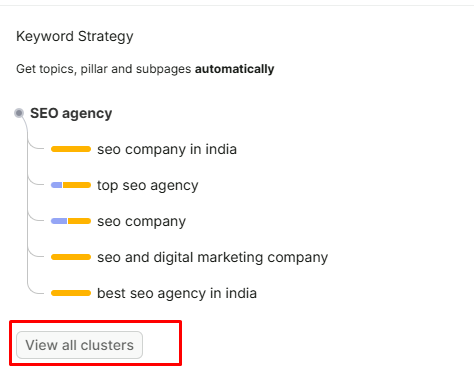
- Keyword Strategy Clusters: SEMrush offers advanced keyword clustering, which groups related terms into a structured framework and helps organize your content by topic rather than by individual keywords. It also recommends which keywords should have their pillar page and which ones fit better as subpages.
- SERP Features including AI Overviews: SEMrush’s SERP Features report includes keywords that trigger AI Overviews. This feature is becoming more valuable.
- Personal Keyword Difficulty: After you connect your domain to a project, SEMrush measures keyword difficulty based on your site. This is similar to what KWFinder calls RKD and Ubersuggest calls First Page Potential.
- Filters beyond volume and difficulty: You can filter by word count, include or exclude certain words, show only questions, or display only keywords that trigger a specific SERP ‘feature.
Step by Step: Researching Keywords with SEMrush
1. Start in Keyword Overview
Start by entering a keyword into the search box and get a detailed overview. You can add up to 100 terms together rather than checking one by one, along with country and state filters.
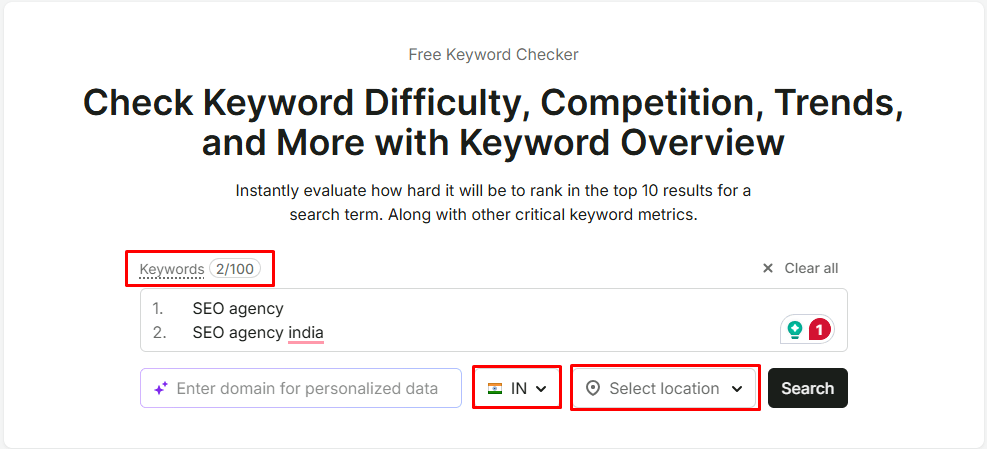
Here is how you will see the keyword overview window:
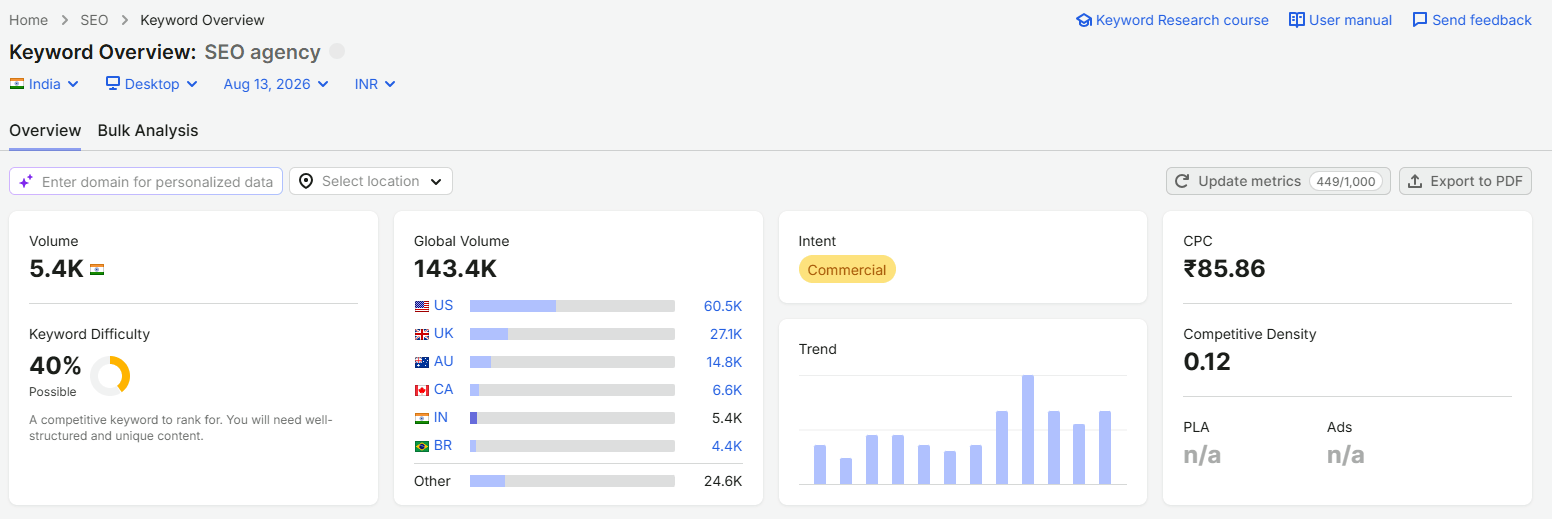
2. Check the search intent
Check the search intent to identify what the user wants. If your end goal is sales and leads, then focus on commercial and transactional keywords and use informational keywords to make understand audience about your product or service.
3. Review the Keyword Strategy clusters
Next. scroll down to Keyword Strategy and look at the clusters. SEMrush builds clusters automatically based on your search.
4. Open the Keyword Magic Tool and set your match type
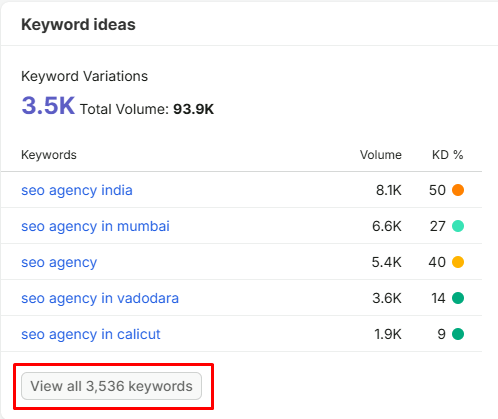
Click “View all keywords” to move into the Magic Tool.
Select keywords match with magic tool.
5. Topics Sidebar
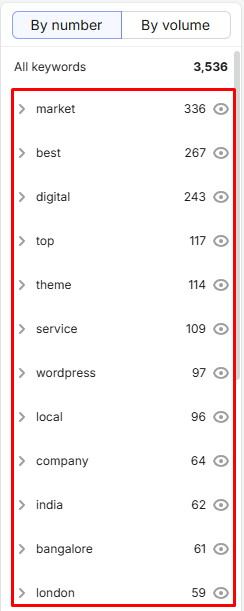
Use the Topic sidebar on the left and click into a specific sub topic to find relevant keywords.
6. Keywords by Filter
You can make you search very specific by using following filters:

- Volume
- KD%
- Intent
- CPC (for PPC)
- Include Keywords
- Exclude Keywords
- Advanced Filters
If your domain is connected to a project, use Personal Keyword Difficulty score to measure keywords value.
7. Check the SERP Features
Look at the SERP feature next to each keyword before you finalize your keywords.
8. Copy or export your list
Tick the checkboxes next to your final keywords and click Copy at the top of the table to send the selection straight to your clipboard for Excel or Sheets.
Bottom Line:
No single keyword research tool is best until you master how to conduct keyword research and understand how to evaluate the data each tool provides.
Before choosing a tool, you need to understand how to conduct keyword research and different insights, such as search volume, keyword difficulty, search intent, CPC, and SERP features etc. When you know how to evaluate these metrics, you can use any tool more effectively and select keywords that are relevant, realistic, and valuable for your business.

Mandeep Singh is a Digital Marketing consultant at Strivers Edge, renowned for driving first-page Google rankings for businesses in competitive industries. With more than 10 years in the industry, he specializes in digital and content marketing.